Showing posts with label Greatest Tricks. Show all posts

Saturday, July 19, 2008

iPhone Blogger Template

Buy iPhone is a new blogger template inspired of course by Apple iPhone it self. this black template has some cool features.


Here are some cool features of this iPhone template.
1. Perfect place of the left top sidebar. You can put your 160×600 ads here. this block shows strike to your readers eyes, so hopefully it will increase your revenue, by increasing your CTR.

2. Featured Posts block on the center of your screen. This you can also put your ads here.

3. The header image, you can change it with your own image up to 750px width and 305px height. to change this image just find this line below
http://img401.imageshack.us/img401/1020/buyiphonelogofw6.jpg
And change it with your own image url.

4. Come with customized post date format. so you don’t need to do anything but this: setting the post timestamp on your blogger formatting set up. please read that step by step carefully.

Set the Date Format
Some of you who use my template must notice that on some templates, I set the Date Format difference to the Blogger default date format.

For some template which have a special format, because I have just moved this site from blogger to wordpress to give you more better services, Some of my posts have changed.

So if you can’t read my Changing Date Format Instruction, here it is.

1. Go to your Dashboard - Settings - Formatting.
there you’ll see Timestamp format.
2. Choose this style: Sat, July 20, 2008
3. Save your setting. and refresh your blog and done!

Later, I will write the tutorial about how to customize the blogger template format by your self. So you can create your own format you want.

This black iphone template images are all hosted on my imageshack.us account.
So I recommend you to move all the images to your own image host. (Your own googlepages or imageshack account or another image hosting service out there).
Download this iPhone here


Friday, July 18, 2008

Hide Your Partitions ( C , D , E , F) for any 5 th and 6 th also

This trick is for all those guys whose wants to tons of data into their disks,We want to store some personal files or data which we don't to show anyone or access it This trick is for all those guys!!

Click start button>run type gpedit.msc, now move to user configuration >administrative templates > windows components > windows explorer, press

double click on "Hide these specified drives in My Computer" after following This steps properly You'll find another option "Prevent access to drives from My Computer" double click on dis option & change it accordingly.

To make it normal again click on "disable" by double clicking on "Hidethese specified drives in My Computer" option ..Thats it ur done with it !!!! enjoy This trick

Sunday, July 13, 2008

A Challenge for You !!!!!

Do you know that you can not create a folder or file named "CON"(without the quotes) anywhere on your Pc.If you dont yet know about this go forward and try it yourself.Try creating a folder named "CON"(without the quotes) anywhere on your hard disk and i am sure you wont be able to do so.

But the bigger challenge is this one !!!

Just copy from here "СON" (without the quotes) and now paste it in your folder or file name .Yes you will be successful now!!!Isnt that strange.

If you write this somewhere else and copy it from there,it wont work.This is the magic.

Reason:The reason is that i am using Unicode.Instead of 67 as the ASCII code of C ,in the unicode,its code is 1057.That is why i am able to make a folder by this name.

Note:If you like the post please comment.Press ctrl+d to bookmark this page.

Find out all the passwords saved in firefox with one click

This is for all the firefox users.Beware!!!

Your stored passwords are not safe.
It is a common task for an average internet user to save their passwords on their personal computers while surfing the web,so that they can avoid the hassle of typing them again and again.Sounds simple and safe.But it is not so .

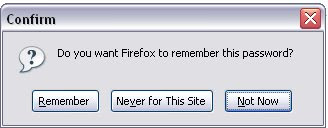
Firefox users would be very familiar with this dialog box:

Most of the users click on 'Remember' and then feel satisfied that their passwords are saved and are safe.Well there is the other side of the coin to it.

In Firefox browser:

Go to Tools->Options.Click on security tab.There is a button 'Show passwords' on that page.Click on it.A window will open which will show your usernames and the corresponding site names.Click on 'Show passwords' button there and then select yes.Voila!!!! What do you see!!!

You would be shocked to see all your passwords listed out with the usernames and the site names.Well,this is the truth.This is a flaw in firefox that can be very dangerous for novice users .Anyone using your computer can find all your passwords within 10 seconds.


HOW TO PREVENT THIS ?

There is a pretty simple way you can protect yourself from this.In the security tab,just above the 'Show passwords' button you have an option 'Set a master password'.Just tick this option.So whenever someone tries to access your passwords he will be prompted for this master password.Your passwords are safe now !!!

Get rid of the annoying Microsoft error reports

Do you often see this when some program crashes or you close an application that is not responding:


This error report sending message can become quite annoying at times,it keeps on bugging the user.Not to worry about.There is a simple way to get rid of it:

1.Go to Start->Control panel.

2.Go to system.Now go to the Advanced tab.

3.Under the advanced tab,at the bottom click on 'Error reporting'.Now click on 'Disable error reporting'.

You are done.You will not receive the error sending report anymore.Have fun.

Monday, July 7, 2008

Set any video as your desktop wallpaper

This is a pretty simple tweak using which you can set any video as your desktop wallpaper.
Just follow the steps given below:


1.Download VLC Media Player and install it.

2.Run VLC media player,go to Settings->preferences->Interface->Main interfaces,then click on wxWidgets.Remove the tick on "Taskbar" and put a tick on "Systray icon".

3.Now go to Video->Output Modules->DirectX.On the bottom right put a tick on advanced options check box.You will now see some options.Put a tick on "Enable Wallpaper Mode ".

4.Now,select playlist and put a check or tick on "Repeat current item ".

5.Press the Save button.Now close the Vlc player and run it again(to save the settings permanently).

6.Now play any video you would like to set as Wallpaper.Right click on the video and click on "Wallpaper".The video would be set as your wallpaper!!!!
Since you have checked the option "repeat current item ",the selected video will play on continuously.It will start again when finished.VLC player will remain in your system tray.If you wish to remove the wallpaper simply close the player and you will get back your original wallpaper.


YOU liked it then plz comment.thankq.

How to know the ip address of a computer connected to internet???

send any attachement throug the chatting and
then goto the command prompt and when
attached computer access the attachement then u type the netstat -n then this command displays the attached computer ip address..
Create A Hidden User Account In XP

This tweak allows an account that is normally displayed on the Welcome screen to be hidden from view. To log on using the account it's necessary to use the Log On To Windows dialog box similar to the one in Windows 2000

#[Start] [Run] [Regedit]
#Registry Key: HKEY_LOCAL_MACHINE\SOFTWARE\Microsoft\WindowsNT\CurrentVersion\Winlogon\SpecialAccounts\UserList
#Modify/Create the Value Data Type(s) and Value Name(s) as detailed below.
#Data Type: REG_DWORD [Dword Value] // Value Name: Type Name of Account to be Hidden
#Setting for Value Data: [0 = Account is Hidden / 1 = Enabled]
#Exit Registry and Reboo
Turn Off Autoplay for Program CDs

Turn Off Autoplay for Program CDs How can you stop Windows XP from launching program CDs?
Click Start, click Run, type GPEDIT.MSC to open Group Policy in the Microsoft Management Console. Double-click Computer Configuration, double-click Administrative templates, double-click System, and then click Turn off autoplay.
The instructions on your screen describe how to configure this setting. Click Properties to display the setting dialog. Click Enabled, and choose CD-ROM drives, then click OK, to stop CD autoplay.
This setting does not prevent Autoplay for music CDs.
Prevent PenDrive Virus

:: Do the following ::
1) Disable autorun/autoplay function of your pen drive.
2) Now plugin your pen drive and open any folder of your computer.(Do not open any folder from ur pen drive.)
3) Now goto tools then select Folder OptionIn that box mark the Show Hidden Files & Folders option.Also Uncheck Hide Extension for known file types & Hide Protected OS files.
Now click apply and ok buttons and close that folder.
4) Nome come to desktop.On the Desktop, click on windows Start button and select Search for files & folders.
When the search dialog box appears on the screen, in that click on All Files & Folders, now click on More Advanced Options then select search Hidden files & folders.
Now go above & in Look In option, select your pendrive letter (For example E: Or G:)and hit Enter.
5) Now if you see any unknown .Exe files, simply delete them all


YOU liked it then PLZ COMMENT.THANKQ.
Multilogin in Yahoo! widout any Software!

Multiple login in yahoo !!
You can login with multiple id's on the same yahoo messenger without any download or patch .
Follow these steps
1. Go to Start ----> Run . Type regedit, then enter .
2.Navigate to HKEY_CURRENT_USER --------> Software --->yahoo ----->pager---->Test
3.On the right pane , right-click and choose new Dword value .
4.Rename it as Plural.
5.Double click and assign a decimal value of 1.
That's it done!!
Now close registry and restart yahoo messenger .For signing in with new id open another messenger

YOU liked it then plz comment.thankq.
U CAN EASILY FIND UR FRIENDS WHETHER THEY R ONLINE OR OFFLINE ON YAHOO JUST BY A SIMPLE TRICK.

Just go to ur address bar and type like this http://mail.opi.yahoo.com/online?u=

Here u= yahoo id of he or she and you will find them whether they are online or offline.
YOU liked it then plz comment. Thankq.
INCREASE YOUR INTERNET SPEED.

Microsoft reserves 20% of your available bandwidth for their own purposes like Windows Updates and interrogating your PC etc
You can get it back:
Click Start then Run and type "gpedit.msc" without quotes.This opens the group policy editor. Then go to:
Local Computer Policy
then Computer Configuration
then Administrative Templates then Network then QOS Packet Scheduler and then to Limit Reservable Bandwidth.

Double click on Limit Reservable bandwidth. It will say it is not configured, but the truth is under the 'Explain' tab i.e."By default, the Packet Scheduler limits the system to 20 percent of the bandwidth of a connection, but you can use this setting to override the default.
"So the trick is to ENABLE reservable bandwidth, then set it to ZERO. This will allow the system to reserve nothing, rather than the default 20%.It works on Win 2000 as well.

How did you like it.please comment.
Note:This trick works only for windows xp sp2 professional and windows 2000 professional.It does not work on windows xp sp2 home edition.

Saturday, June 28, 2008

Block websites without any software

This small tutorial could keep you going in simple way of blocking websites without using any software.

1.Browse C:\WINDOWS\system32\drivers\etc
2.Find the file named "HOSTS"
3.Open it in notepad
4.Under "127.0.0.1 localhost" Add 127.0.0.2 www.yahoo.com , and that site will no longer be accessable.
5.Done!
Show ur name after time in taskbar

Hi guys !I m here to tell u a trick to add up ur name in place of AM and PM beside time and make urself to feel proud among ur group of frnds.
Its simple
Start -> Control Pannel -> Regional and LAnguage option -> Customize (beside English US) -> Go to TIME tab -> Change AM symbol and PM symbol from AM and PM to ur name -> Apply -> Ok ...
IS it changed ??? Might be not ...Now go to time in taskbar and Double Click it to open "Date and time property" ...Look place where time chnges in digital form i.e. 02:47:52 AM , click to arrow to cnage the AM or PM by selecting and press arrow
Restart windows without restarting your pc

this works both with windows vista and xp.so hers the trick..
Windows vista :
Select Start, then hover over the right arrow that is to the right ofthe padlock icon until the pop-up menu appears that contains “restart”as one of it’s choices. Hold down the SHIFT key while clicking on the“restart” choice.

Windows xp : Select Start. Select “Shut Down…”. Change the drop-down combo box under “What do you want the computer to do?” to “Restart”. Hold down the SHIFT key while clicking on the “OK” button.
How To Reinstall Windows Without Losing Anything

How To Reinstall Windows Without Losing Anything Here Is Another Possible Solution:easy way and tested:
1- Start WindowsXP
2- Go to the location of your source files
3- Run WINNT32 /unattend
For example, D:\I386\winnt32 /unattend ( copy & paste this command into the RUN box, then press ENTER ) Your computer will do the rest.
Or,
Start > All Programs > Accessories > Command Prompt.
Copy & paste > D:\I386\winnt32 /unattend
Press Enter.
If you have i386 on your drive, you can replace D: ( if D: is your cd drive ) with the location of it.
I've often need to do this to repair something that had gotten corrupted and didn't want to do a clean install.
D: is the driver letter where your windows XP Cd is
if D:\I386\winnt32 /unattend doesn't work then try : d:\winnt32 /unattend.
How to exceed your download limit on Rapidshare/Others
NOTE: complicated, and yes there are proxy sites to get around rapidshare, however there are none currently that'll get around rapidshare.com:

Okay, here is a quick tutorial on how to get around those annoying "Wait X minutes before downloading" messages, as well as the one-file-at-a-time limits that are frequent on Rapidshare and similar sites. This tutorial uses Opera (because it has the best download manager), but can probably be adapted for any browser

Step 1. Since this will slow down each download quite a bit, pick 4 or 5 Rapidshares that you've always wanted. This will give you the most speed boost.

Step 2. Start the biggest one as you normally would, by clicking the "Free" button.

Step 3. Now pick a proxy from here.

configure your browser to use it. (In Opera, Tools/Preferences, Advanced tab, Network on the right, then click the Proxy Servers button.

Before the colon is the IP, after is the port.

Step 4: Finally, test it for speed. If the proxy seems pretty fast, start the next download, and repeat Step 3&4 until you have all your files downloading. If it seems too slow, repeat step 3 until you find a fast one.
This summary is not available. Please click here to view the post.